Friday, March 2, 2012

Dr. Seuss on the iPad

Permission Granted to Pin this Picture
If you've been following many Early Childhood Education blogs, you might have noticed there's been many cute Dr. Seuss-related crafts and activities being shared. As I was thinking about what to write, many of my own childhood Dr.Seuss memories came flooding back---such as waiting for the one time of year The Grinch and The Cat and the Hat would be actually be on t.v. (Yes, there was a time where you had to wait to watch a program. :)


My 5yr. old and 3yr. old though, have experienced Dr. Seuss in a totally different way than I ever did--- on the iPad.

Dr. Seuss One Fish Two  Fish Red Fish Blue Fish

My daughters can access many of the classic Dr. Seuss iPad books at the touch of a finger. The books can play like a movie, be read alone, or read aloud.

Dr. Seuss There's No Place Like Space

In addition, if my girls touch some of the words or objects in the pictures, the iPad tells them the word. They are able to have an interactive reading experience.

There's a Wocket in my Pocket
 My girls have been enjoying Dr. Seuss on the iPad. We often use the stories as a type of "listening center" during the day. Sometimes I pair hands-on activities to go along with the books, such as the Wocket in my Pocket game and craft we did after reading the book on the iPad.

If I Ran the Zoo by Dr. Seuss
Yes, the iPad and other e-readers open up a whole different world of silly Seussical, rhyming reading memories for children.

Happy Birthday Dr. Seuss!

Labels: ,

Friday, January 13, 2012

App Activities: The ABC's and a Zoo

Each week it seems like I learn about more educational apps and uses for the iPad. I thought I'd share what we've been doing with our iPad this week.


As usual, my preschooler and toddlers seem to use the iPad more than their older sisters and brother. I have some great ideas for the older kids though which I hope to share in an upcoming post.


Our new app of the week is The ABC's of God. This app is geared toward young children learning letter recognition. It pairs scripture with the process of learning letters. What a great combination!

★Trace each character in a wooden stencil, on a felt pad, and on a chalkboard!
★Find letters using a flashlight, match them on a fridge, and more!
★Unlock bonus games and collect stickers!
★And learn about who God says He is, in His Word!


I love that I don't have to print out worksheets for this type of letter identification practice. Right there covers the price of the app! :) Children find the letters in various settings. First they find the capital A on a page with only one correct answer. They do the same for the smaller case letter. Then they come to a page as seen above where they have to find multiple capital letters, then lowercase. Finally they find both capital and lower-case version of the letter in a Bible verse. This app is well-done and a great fit for my family.


Our new book of the week is Dr. Seuss's If I Ran the Zoo by Oceanhouse Media.This is a classic Dr. Seuss book made new for the iPad/iPhone. This book is about young Gerald McGrew who knows just what he'd do if he ran the zoo. He'd find the most unusual animals in all the out-of-the-way places. In typical Dr. Seuss style, the creatures are all very imaginative. This book is actually pretty long and we had to read it during several different sittings. Good thing it has the "Read to Me" setting! :) That is one feature I love about OMbooks. It makes this an easy way to turn the iPad into a listening center.


A nice craft extension after reading this book would be to create your own animal to put in the zoo. We used pieces from our Bug Craft Kit.

What has been your favorite app this week?


You might also be interested in:
There's a Wocket in my Pocket

Labels:

Tuesday, December 6, 2011

The First Christmas

Today's book is The First Christmas by John Wilkie illustrated by Jodie McCallum. This is an iPad app book by PicPocket Books.

Summary: Written from the perspective of Mary's donkey, the rhyming text tells about Christ's birth. It starts on the journey Mary and Joseph had to take to Bethlehem and ends with the visit from the Magi.

This is the first book I've downloaded from PicPocket Books. I loved that it told the story of the birth of Jesus and I thought the illustrations were adorable. We have another book that is illustrated by Jodie McCallum (which we will be sharing later.)


The book is narrated by a young girl, and while she reads, the word she is saying turns to red. I like this feature for it helps beginning readers "read" along with the story. If you touch the animals in the story you can hear them make noises.


For a book extension activity, I pulled out the Nativity cards I printed from 1+1+1=1 last year. Once again we read the story and then matched our little people animals to the cards. My 3yr. old and 5 yr. old had fun trying to teach my 1 yr. old the animal sounds.


Labels: , ,

Monday, December 5, 2011

The Berenstain Bears Trim the Tree

Today's Book is The Berenstain Bears Trim the Tree by Mike and Jan Berenstain. We read this book on our iPad but you can also purchase a traditional copy.

Summary: A cute lift-the-flap book perfect for toddlers and preschoolers. The Berenstain Bears work together to decorate their Christmas tree.

The traditional book and the Trim the Tree iPad app from Oceanhouse Media both have lift-the-flap features! What I like about the ipad app is that it has three different modes to choose: Read to Me, Read it Myself, and Auto Play. For my little girls, I use this like a listening center. They can listen to the book on their own--which they did multiple times.


To promote reading in young children, individual words are highlighted as the story is read and words zoom up when pictures are touched. You can see in the picture above that she just lifted the flap to reveal a kitten, and when she touched the kitten, the word appeared. The narrator also says the word name too.


Since the book was all about Christmas tree decorations, I thought it would be a perfect time to work on our tradition of decorating wooden photo ornaments. Each child does one each year to hang on our tree. I usually have my younger kids use markers to decorate the ornaments since they usually create less of a mess this way and have more control over where the color goes.


I love looking at the photo ornaments each year, seeing how each child has grown up in just a year's time.

Do you have any Christmas ornament traditions?

Click to see more Christmas books

Labels: , ,

Thursday, November 17, 2011

iPad Apps Update and iPad Bag (giveaway)


I have enjoyed figuring out how to incorporate the iPad into our school day. I still mainly use it with my two younger girls, ages 3 and almost 5. My favorite activity is to set up the iPad as a listening center. Sometimes I turn on Pandora and have them listen to some music while drawing or doing crafts. We might talk about what they are hearing, “What instrument was that high sound? Does this sound sad or happy?”


readingyipad

Their favorite though, it to “read” their books on the iPad. So far we have enjoyed many books from Oceanhouse Media. They have several different collections of “OM Books” which are books that have interactive elements incorporated. Here’s what is loaded on my iPad at the moment:

ipadbooks

Except for Bob Books, these are all books created by Oceanhouse Media. I love that they turned books we are already familiar with into interactive books. I shared how we used There’s a Wocket in my Pocket, and gave my opinion on Berenstain Bear’s Bedtime Battle and Leo.


I’m sure there are other good children’s book apps out there, but I haven’t researched them.  I’ve been impressed with the Om books so I haven’t ventured far from what already works for us. :) They have a great collection of familiar authors and book titles that I already love.


Talking about love, I *heart* my ipad bag! I know, I know I’ve shared this before, but this is one purchase I am thrilled I made. It makes carting around my iPad so easy! I used it at The Relevant conference, I bring it to co-op, and carry it to church (yes, I take notes on my iPad at church!) It is sturdy and stylish. I bet you would love one too…

Borsa Bella is letting me giveaway 1 iPad travel bag to one of you! And even better---you get to pick your own fabric design!

Even if you don’t own an iPad you can use this bag! Interested in getting one right away? Check out Borsa Bella Bags on Etsy or at The Borsa Bella website.

*I am running this giveaway a little differently than previous giveaways. There is a form below where you will check off the tasks you have completed for the entry. So if you need to comment for an entry, you will comment then go check that option off on the form. I’m hoping this method will make organizing all the entries easier. If you are reading this post in a reader, you will need to come to the site to see the form.

*See My Complete Giveaway Rules


Labels: ,

Wednesday, September 28, 2011

App Activities: Splingo!

Each week I look for different ways to utilize our iPad in our homeschool. Recently my friend Pam and I have been brainstorming ways to use the iPad at home and in her speech classes. While looking through various apps, I came across Splingo’s Language Universe.  What caught my attention was that this app was designed to help children listen and understand verbal language. Since I was currently working on listening skills with my 3yr. old and 4.5 year. old, I thought this might be a good app to try out.

splingoapp splingoweb

What Is It?

Students must follow Splingo the alien’s instructions by moving or dragging objects on the screen. Teachers/Parents can customize which aspect of language you want your student to practice: nouns, verbs, prepositions, and adjectives. Since this app was developed in the UK, there is the US or UK dictionary option.

splingo1

Once students complete a series of instructions correctly, they get to add a piece on to Splingo’s rocket.

Splingo contains 4 different levels:

•Level 1 -contains instructions of 1 main word and is suitable for children at a developmental level of about 18 months onwards, e.g. “find the apple”

•Level 2 - contains instructions of 2 main words and is suitable for children at a developmental level of about 2-3 years, e.g. “find the red apple”

•Level 3 - contains instructions of 3 main words and is suitable for children at a developmental level of about 3- 4 years and upwards, e.g. “find the big red apple”

•Level 4 - contains instructions of 4 main words and is suitable for children at a developmental level of about 4 years and upwards, e.g. “give the big red apple to the boy”

What We Thought:

splingo2

Right away this was a hit with both of my girls. They had to listen carefully to the instructions and think about what action to take. Occasionally the instructions were hard to understand, but the girls could click on Splingo and have the message repeated. I liked that I could choose which language aspects to work on and the complexity of the instructions. My girls thought they were just playing a game but were actually working on concepts such as size, color, shape, and positional language (on, above, under etc.) I’m happy with this app purchase and I can see many ways to utilize it in our homeschool.

Details:

Splingo is designed for both iPhone and iPad and is currently priced at $2.99

You might also be interested in:

App Activities: There’s A Wocket in My Pocket
App Activities:Berenstain Bears
App Activities: Summer App List

Labels: ,

Friday, September 9, 2011

There’s a Wocket in My Pocket

One skill I have been working on with my toddler and preschooler is being able to hear when words rhyme.  I pulled out There’s a Wocket in My Pocket this week for some rhyming word practice. wocket

During the week my daughters were able to listen to the story again on their own at our  iPad listening center (aka kitchen table.) Oceanhouse Media has many of the Seuss books available on the iPad as omBooks. This means they are more than just a book--there are some interactive qualities added.

There are Three Reading Options:
  • * "Read to Me" — listen to the narrated story with words highlighted as they are read
  • * "Read it Myself" — read the book in its traditional form
  • * "Auto Play" — plays like a movie, automatically reading and turning pages. Great for younger children!

 ipadwocket

 ipadwocket2

After listening to the story, they completed several activities.

wocketgame

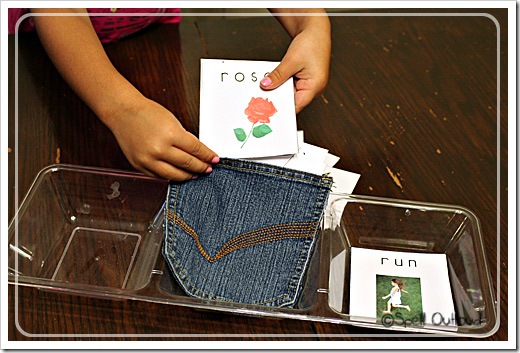
First they worked on matching rhyming word pictures. I printed out rhyming word picture cards from Homeschool Share. Then I placed them in a divided dish.

wocketgame2 
Each stack contained one of the rhyming word cards. My daughter picked up on stack and would try to find the card that rhymed with the top card on the stack still in the tray.

wocketgame3 
Once she found the rhyming word matches, she put those pairs in the pocket.

wocketfame4

Fun in First Grade did a similar activity, but created a vowel sorting activity. She included a free printable of the words.

 wocketcraft

Next we created our own Wocket to put in a Pocket.

wocketcraft2

We had a fun time working on rhyming words this week.

There's a Wocket in my Pocket
And an iFrad on my iPad.
Silly words that sound the same,
Make for such fun rhyming word games.

ipadbutton

Labels: ,

Thursday, August 4, 2011

Learning with an iPad: Bags and Books

borsabellabag

One random fact about me is that I hate buying purses. I can’t remember the last time I bought a purse. My friend Pam took pity on me a couple years ago and gave me one of her own purses. My mom has given me hand-me-downs. I’m just not a purse person. I hate spending the money and they always fall off my shoulder. Plus, I’m used to diaper bags—lol.

2borsabellabag

I bought this though. I love this bag from Borsa Bella! It’s technically not a purse, but it could be. Can you see what’s inside? Yep. My iPad. This is not an iPad case (I’m getting one of those soon thanks to you who use my Amazon affiliate buttons), but rather a cool way to be able to carry around your iPad. It is made so well. In addition to the main pocket, there is an outside zippered pocket perfect for keys, wallet, additional electronic device etc. I decided I needed a way to carry my iPad back and forth from our upcoming co-op classes. I plan on utilizing my iPad for several activities and wanted a bag that gave some protection. I searched for awhile before coming across this bag. I highly recommend Borsa Bella if you are in need of a bag for any of your electronic devices (Nook, Kindles, iPads, purses, and more). Besides being functional—they are so pretty!

If you are thinking about a bag, Melissa from Borsa Bella is giving you all a 10% coupon code good on her site: Spell10

readingwithipad

What Have We Been Doing with the iPad?

So far I’ve been using the iPad with my toddler and preschooler the most. We’ve just started downloading books to read. One of our newest books is The Berenstain Bears' Bedtime Battle.

BookBBBedtimeBattle_00

My girls were already familiar with the Berenstain Bear family so they were so excited to see that we could read this on the iPad.

BookKWLeoTheLightningBug03

We also have Leo the Lightning Bug book on our iPad. This is a cute story about a little lightning bug who can’t light up no matter how hard he tries.  He feels like he’s too little to do anything. With a little encouragement and some confidence, he find out that he can do it.

Both books have 3 different modes:
* "Read to Me" — listen to the narrated story with words highlighted as they are read * "Read it Myself" — read the book in its traditional form
* "Auto Play" — plays like a movie, automatically reading and turning pages.

Leo the Lightning Bug has hidden sounds if you click on the pictures. Berenstain Bears show the words for the items clicked, so there are also some interactive aspects to the books too. I thought the narration and audio quality for both were well done. The pages stuck a little on the Leo book in the Read it Myself mode, but once I figured out where I needed to “flip” the page, it was fine.

I’m excited to be able to use the iPad with books. Remember the books on tape centers at school? Well I think that I’m going to do something similar with my  toddler/preschooler. After reading and discussing the book together, I’m going to create a center opportunity with the iPad and pocket chart/magnetic board/writing center. I’ll post once I put my idea into action. :)

If you have an iPad, how will you be integrating it into your curriculum this year?

Disclosures: I was given The Berenstain Bears and Leo the Lightning Bug apps free for review purposes only. Opinions are mine.

Labels:

Wednesday, June 29, 2011

Summer Learning with an iPad

ipad2

I will admit that I like technology. I’m a digital scrapbooker, a digital photographer and a blogger. I had seen how others were using the iPad for educational purposes and I put one on my mental wish list. I didn’t expect to get one though. I was very surprised when my husband came home and handed me one for our 15th anniversary (which isn’t until August—lol) Through a bunch of cool circumstances he was able to get one for me! This has worked out perfectly as a summer learning tool for my children. The newness and the different format is making them excited about practicing math facts, geography, and reading (I’m hoping this will be a big motivator for a specific child of mine).

ipad62011

My 4yr. old and almost 3yr. old have found ways to use it too. One of the first things I did was to download all our Songs for Saplings songs and our Seeds Family Worship songs that we use for Bible/school. It drove me nuts to try to find a cd player or play the songs off of my computer. Because of that, half of the time we would forget to sing our songs. Now I just bring the iPad into the room and the girls and I can sing together.

Of course we had to add some fun apps. In the pictures above my girls are playing Toca ‘s Tea Party. They love this game. We also have Toca ‘s Hair Salon and Doctor too.

KiboomuAnother game they played was Preschool Sing & Learn by Kiboomu. They enjoyed the songs, coloring, and the puzzles.

iPad Resource Lists:

There are so many resources to use with the iPad that it can be overwhelming. When checking out what to get or put on my wish list I went to the following sites:

1. For a great listing of education iPad apps, check out Carisa’s list:

2. For a listing of some of the best children’s books available on the iPad check out the post from Imagination Soup.

3. For general app information and news about new apps, check out Moms with Apps.

Do you have any other educational app lists to check out or  iPad apps I should def. put on my to-get list?

Labels: